In APA Style (7th edition), the title page (or cover page) is the first page of a paper. It tells the reader what the paper is called, who wrote it and which institution it comes from. A title page should include:
- A running head (a shortened title in the page header; professional papers only) and page number
- The title of the paper
- The name of the author(s)
- The institutional affiliation (the school or university where you studied or did the research)
- An author note (optional, professional papers only): extra details such as acknowledgements and contact information
- A student paper should also include course information
Note : APA 7 provides slightly different directions for formatting the title pages of professional papers (e.g., those intended for scholarly publication) and student papers (e.g., those turned in for credit in a high school or college course).
Professional paper APA title page
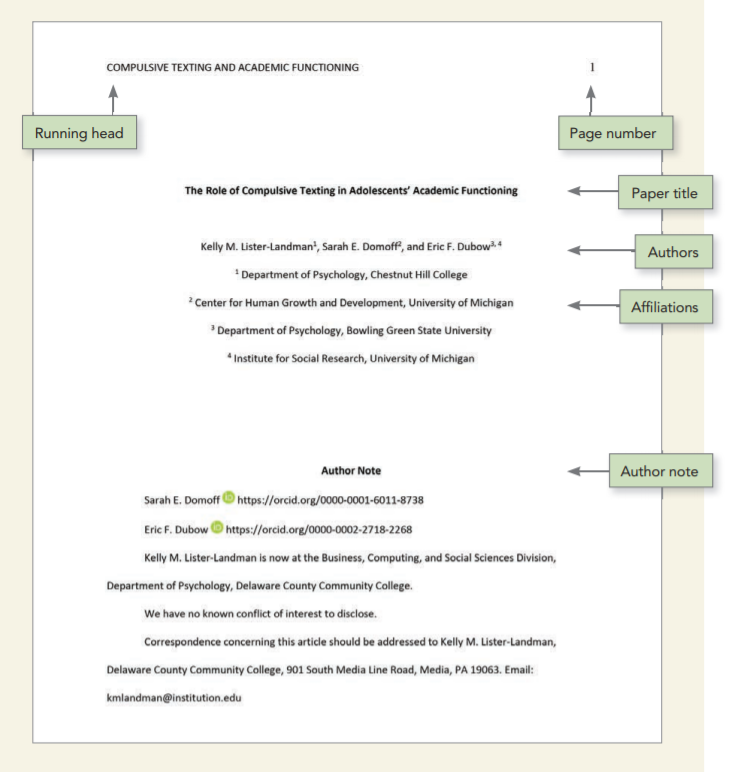
A professional paper is a manuscript prepared for a journal or similar publication. Its title page adds a running head and an author note.
- Running head: the title, or a shortened form of it, in capital letters at the left of the header on every page. It cannot exceed 50 characters.
- Page number: at the right of the same header, starting with 1 on the title page.
- Affiliation: the institution where the research was done. When co-authors have different affiliations, superscript numerals link each name to its institution.
- Author note: placed in the bottom half of the page under a bold, centered “Author Note” label. It holds details such as ORCID iDs, acknowledgements and contact information.
Student paper APA title page
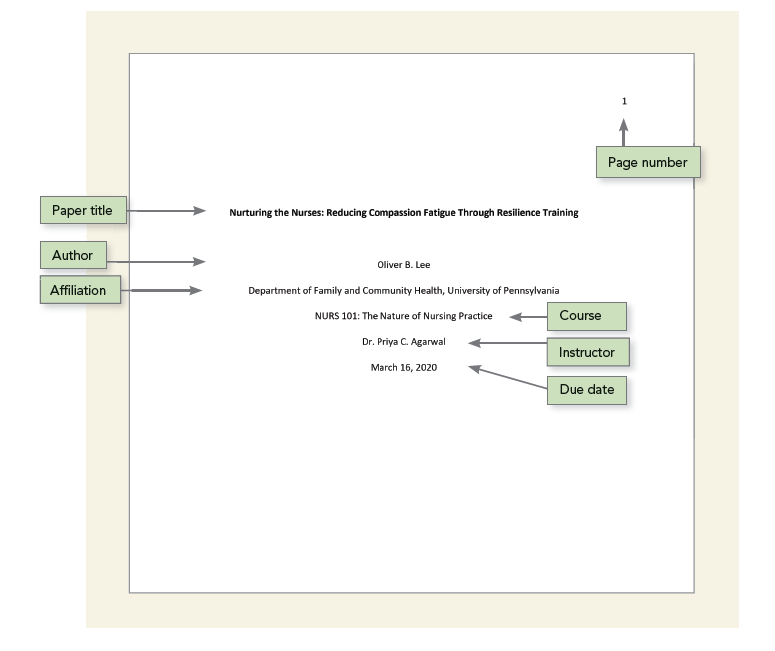
A student paper uses the simpler version. It has no running head, only a page number in the header. Everything else is centered and double-spaced, and only the title is bold.
From top to bottom, a student title page contains:
- Page number: at the top right, starting with 1. It is the only item in a student header.
- Title: bold, in title case, three or four lines below the top of the page.
- Author name: on its own line, after one blank double-spaced line.
- Affiliation: the department and institution, separated by a comma.
- Course: the course number and name, as shown on your course materials.
- Instructor: the instructor’s name, with a title such as Dr. or Professor.
- Due date: the month spelled out, in your country’s date format.
If your assignment sheet asks for something different, follow it. The manual’s defaults apply only when nobody has said otherwise.
Formatting an APA title page
Note : Double-space all text on the title page. Center every line of the title block. Only the header items sit at the edges: the page number at the right and, on professional papers, the running head at the left.
The 7th edition gives you more choice of font. Examples the manual offers include Calibri 11, Arial 11, Lucida Sans Unicode 10, Times New Roman 12, Georgia 11 and Computer Modern 10. Use one font throughout the paper.
Margins, Spacing and Page Order
The title page sets the format for the rest of the paper. Apply these settings throughout:
- Margins: one inch on every side.
- Spacing: double-spaced text, aligned left (not justified), with one space after each period.
- Paragraphs: indent the first line half an inch with the tab key, not the space bar.
Each section usually starts on a new page. The order is the title page, the abstract, the main text and the reference list, followed by any footnotes, tables, figures and appendices. Student papers usually need an abstract only when one is requested.
Running Head
In the 7th edition, only professional papers submitted for publication require a running head. Student papers do not. They still need a page number.
On a professional paper, the running head sits flush left at the top of the page. The page number sits flush right.
Place the running head in the page’s header:
- The running head is the abbreviated title of the paper in UPPERCASE LETTERS. Align it left in the header of every page, including the title page.
- A running head can be at most 50 characters, counting spaces and punctuation. If the whole title fits, use it as it stands.
- The “Running head:” label used in the APA sixth edition is no longer used.
- Place the page number in this same header, but align right, beginning with page number 1 on the title page.
- This header should be 1 inch from the top. Some instructors allow for 1/2 inch, too, but the default is 1 inch.
Paper Title
Position the title three or four lines below the top of the page, in the upper half. Center it and write it in bold title case, with the important words capitalized.
The 7th edition sets no maximum length. The 6th edition recommended 12 words, but that limit has gone.
A good title is focused and includes the key terms a reader would search for. Avoid abbreviations and words that serve no purpose.
Put a main title and any subtitle on separate double-spaced lines. The title is repeated, bold and centered, at the top of the first page of the main text.
Author Name(s)
Position the author name below the paper title, centered and double-spaced, after one blank double-spaced line.
Write the full name: first name, middle initial and surname. Do not use titles (Dr.) or degrees (Ph.D.).
With two authors, place “and” between the names. With three or more, separate the names with commas and put “and” before the last name.
Do not use an ampersand (&) in the author line. It belongs only in bracketed citations and the reference list (see citing a source with multiple authors).
Institutional Affiliation
Position the affiliation below the author name, centered. For a student, this is the institution you attend: the department and the institution, separated by a comma.
A student paper then adds three more centered lines:
- Course: the course number and name, as shown on your course materials (for example, PSY 201: Research Methods).
- Instructor: the instructor’s name, with a preferred title such as Dr. or Professor.
- Due date: the month spelled out, in your country’s format (October 7, 2026 in the United States; 7 October 2026 in the United Kingdom).
On a professional paper, the affiliation is the institution where the research was done. If co-authors have different affiliations, superscript numerals link each name to its institution.
What Changed From the 6th Edition
Many guides still describe the 6th edition. These are the differences that affect the title page:
| Feature | 6th edition | 7th edition |
|---|---|---|
| Student paper | One format for every paper, with a running head | Separate student version: page number only, no running head |
| Running head | “Running head:” label on the title page | Label dropped; the same running head on every page |
| Title length | Recommended maximum of 12 words | No maximum; focused, with key terms |
| Title style | Not bold | Bold |
| Font | Times New Roman 12 | A range of accessible fonts, such as Calibri 11 or Georgia 11 |